Metasequoia uses a new default file format from version 4.7 which has extension *.mqoz.
This a just a *.zip file that contains an *.mqo file and a thumbnail.jpg file and maybe an *.mqx file.
Below are examples in Delphi 10.2 and Python 2.7 that show how to read the *.mqo inside the *.zip.
Showing posts with label Python. Show all posts
Showing posts with label Python. Show all posts
Friday, 17 May 2019

Thursday, 22 June 2017
Writing GIMP Python plug-ins
Notes about writing Python plug-ins for the GNU Image Manipulation Program (GIMP).
The documentation for GIMP Python aka PyGIMP aka Python-fu is woeful.
The official docs are here, [link].
Some web pages for beginners to start with:
The documentation for GIMP Python aka PyGIMP aka Python-fu is woeful.
The official docs are here, [link].
Some web pages for beginners to start with:
- http://zwell.net/content/pygimp.html
- http://www.neuraldump.com/2017/01/program-python-plug-ins-for-gimp-hello-gimp-world/
- https://web.archive.org/web/20150808044417/http://www.exp-media.com:80/content/extending-gimp-python-python-fu-plugins-part-1
- http://tinker.kotaweaver.com/blog/?p=81
- http://muras.eu/2012/05/06/Basic-python-script-for-Gimp/
- https://patdavid.net/2014/02/getting-around-in-gimp-plug-ins-and.html
- http://gimpbook.com/scripting/ (view the slides)
- http://gimpbook.com/scripting/notes.html
- https://www.ibm.com/developerworks/library/os-autogimp/
- http://wiki.elvanor.net/index.php/GIMP_Scripting
- https://gimplearn.net/viewtopic.php/How-to-write-Plug-in-for-GIMP-in-Python?p=10844#p10844
Wednesday, 9 March 2016
Metasequoia Script for Reference
RedRogueXIII has some Metasequoia Scripts on GitHub that can be studied to see how to create dialogs for your Metasequoia scripts.
https://github.com/RedRogueXIII/MetasequoiaScripts
The script shrinkwrap.py didn't work for me because for some reason the target object was not being set. I had to hardcode the target object. Since I had only one object in the target list I had to make sure I clicked on it for it to be set.
The script moves the selected vertices in a source object to the surface of the target object if a ray from the vertices in the chosen direction intersects a face of the target object.
The faces in the target object must be all triangles.
https://github.com/RedRogueXIII/MetasequoiaScripts
The script moves the selected vertices in a source object to the surface of the target object if a ray from the vertices in the chosen direction intersects a face of the target object.
The faces in the target object must be all triangles.
Wednesday, 1 July 2015
Metasequoia Script - Read uklogo.pak
uklogo.pak is the file which stores the title graphic for classic Tomb Raider games (TR1 to TR5).

In this post I will write a script that reads the uklogo.pak file.

In this post I will write a script that reads the uklogo.pak file.
Saturday, 12 July 2014
Metasequoia Script – Import MilkShape3D *.ms3d
Here is a script that imports a model from a MilkShape3D *.ms3d file.
The script uses Python 3 modules, syntax and objects so can only be used as is with Metasequoia 4.
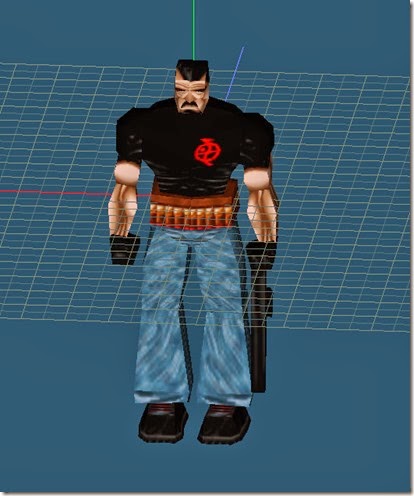
The script uses Python 3 modules, syntax and objects so can only be used as is with Metasequoia 4.

Monday, 30 June 2014
Metasequoia Script – Using Quaternions to Rotate Points
You can use a Python script in Metasequoia to demonstrate the quaternion sandwich product rotating a point.
I have set up a Metasequoia document as shown below.

I have set up a Metasequoia document as shown below.

Sunday, 22 June 2014
Metasequoia Script – Import one of your own modules
Sometimes a Metasequoia Python script may contain many lines of code.
To keep the script simple you can split the script into several smaller scripts.
For instance you could have all your function definitions in a script of their own.
To access those functions you would import the script containing your functions into your main script the same as we have been doing for Python’s inbuilt modules such as “math”.
The script you import must have a filename that is a valid Python identifier so cannot start with a number and use only letters or numbers or the underscore, ‘_’.
The script file must have the extension ".py".
The script you import must not have any executing code or only have executing code in an “if __name__== “__main__”:” block.
For Metasequoia 4 the script or scripts you import must be in the same folder with the main script.
If you use Metasequoia’s MQSystem classes in the script you import, in that script you must explicitly import the MQSystem module as follows or you will get errors.
To keep the script simple you can split the script into several smaller scripts.
For instance you could have all your function definitions in a script of their own.
To access those functions you would import the script containing your functions into your main script the same as we have been doing for Python’s inbuilt modules such as “math”.
The script you import must have a filename that is a valid Python identifier so cannot start with a number and use only letters or numbers or the underscore, ‘_’.
The script file must have the extension ".py".
The script you import must not have any executing code or only have executing code in an “if __name__== “__main__”:” block.
For Metasequoia 4 the script or scripts you import must be in the same folder with the main script.
If you use Metasequoia’s MQSystem classes in the script you import, in that script you must explicitly import the MQSystem module as follows or you will get errors.
import MQSystem
Saturday, 21 June 2014
Metasequoia Script – Display an OpenFile Dialog
This script shows how to display an OpenFile dialog in Metasequoia 4.
Metasequoia 3 doesn’t have the MQWidget classes so this script is only for Metasequoia 4.
You use an OpenFile dialog to get a filename (actually the full path to a file) for your script.
Once your script has a filename you could use standard Python code to read the file.
You could, for example, write a script to open a 3D file format that Metasequoia does not support.
Metasequoia 3 doesn’t have the MQWidget classes so this script is only for Metasequoia 4.
You use an OpenFile dialog to get a filename (actually the full path to a file) for your script.
Once your script has a filename you could use standard Python code to read the file.
You could, for example, write a script to open a 3D file format that Metasequoia does not support.
Friday, 20 June 2014
Metasequoia Script – Script Template
See this post [link] for the basics of using Metasequoia’s Script Editor.
Here is a Python script you can use as a starting point for your scripts.
Here is a Python script you can use as a starting point for your scripts.
Monday, 16 June 2014
Metasequoia Script – Mikoto bdef bone influence
See this post [link] for the basics of scripting in Metasequoia.
In this post [link] I talk about how Mikoto assigns vertices to a bone using the geometry of the triangle created in Metasequoia for bdef meshes without using anchors.
To help visualise which vertices will be bound to a bone I wrote a script that shows the zone of influence of each bone.
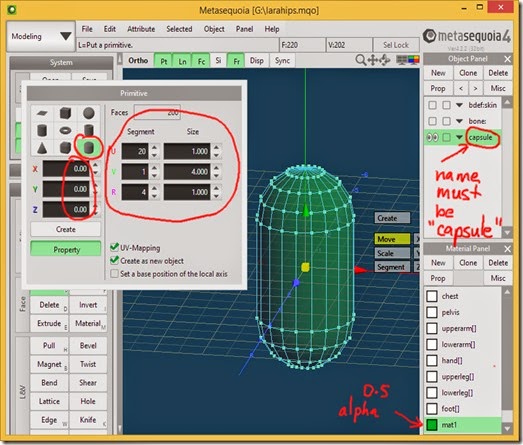
The Metasequoia Python API doesn’t have routines to create Primitive objects so rather than create an object in code this script requires a Primitive to be created in Metasequoia which it can copy.
The Primitive object must be named capsule and have its properties set as shown in the screenshot below.
In this post [link] I talk about how Mikoto assigns vertices to a bone using the geometry of the triangle created in Metasequoia for bdef meshes without using anchors.
To help visualise which vertices will be bound to a bone I wrote a script that shows the zone of influence of each bone.
The Metasequoia Python API doesn’t have routines to create Primitive objects so rather than create an object in code this script requires a Primitive to be created in Metasequoia which it can copy.
The Primitive object must be named capsule and have its properties set as shown in the screenshot below.

Saturday, 7 June 2014
Metasequoia Script–Lots of cubes
Friday, 6 June 2014
Metasequoia Script–Sierpinski Triangle Pyramid
See this post [link] for the basics of using Metasequoia’s Script Editor.
I found an interesting script at this Japanese blog [link].
Make sure you have an empty Scene in Metasequoia by clicking File>New then open the Script Editor and paste the code into the upper input pane of the editor.

Press F5 or Script>Run to execute the script and create the object.

I found an interesting script at this Japanese blog [link].
# fractal generate

doc = MQSystem.getDocument()

num = doc.numObject
obj = doc.object[0]

# field

x = 100
y = 100
z = 100
rn = 4 # recursive number

# Primitive

p01 = MQSystem.newPoint(x/2,y,z/2)
p02 = MQSystem.newPoint(0,0,0)
p03 = MQSystem.newPoint(x,0,0)
p04 = MQSystem.newPoint(x,0,z)
p05 = MQSystem.newPoint(0,0,z)

# function fractal()

def fractal(number,p1,p2,p3,p4):

  if number == 1:

    #left

    v = []
    v.append( obj.addVertex(p1) )
    v.append( obj.addVertex(p2) )
    v.append( obj.addVertex(p3) )

    obj.addFace(v)

    #right

    v = []
    v.append( obj.addVertex(p1) )
    v.append( obj.addVertex(p3) )
    v.append( obj.addVertex(p4) )

    obj.addFace(v)

    # bottom

    v = []
    v.append( obj.addVertex(p4) )
    v.append( obj.addVertex(p3) )
    v.append( obj.addVertex(p2) )

    obj.addFace(v)

  else:
    p5 = MQSystem.newPoint((p1.x + p2.x)/2, (p1.y + p2.y)/2, (p1.z + p2.z)/2)
    p6 = MQSystem.newPoint((p2.x + p3.x)/2, (p2.y + p3.y)/2, (p2.z + p3.z)/2)
    p7 = MQSystem.newPoint((p3.x + p1.x)/2, (p3.y + p1.y)/2, (p3.z + p1.z)/2)
    p8 = MQSystem.newPoint((p3.x + p4.x)/2, (p3.y + p4.y)/2, (p3.z + p4.z)/2)
    p9 = MQSystem.newPoint((p4.x + p1.x)/2, (p4.y + p1.y)/2, (p4.z + p1.z)/2)
    p10 = MQSystem.newPoint((p4.x + p2.x)/2, (p4.y + p2.y)/2, (p4.z + p2.z)/2)

    fractal(number-1,p1,p5,p7,p9)
    fractal(number-1,p5,p2,p6,p10)
    fractal(number-1,p7,p6,p3,p8)
    fractal(number-1,p9,p10,p8,p4)
    fractal(number-1,p7,p8,p10,p6)

# endfunction fractal()

#main()

fractal(rn,p01,p02,p03,p04)
fractal(rn,p01,p04,p05,p02)
Make sure you have an empty Scene in Metasequoia by clicking File>New then open the Script Editor and paste the code into the upper input pane of the editor.

Press F5 or Script>Run to execute the script and create the object.

Thursday, 5 June 2014
Decompiling Python programs
The EditWad program [link] was written in Python 2.5 and packed into an *.exe file using py2exe [link].
Packing a Python program into an *.exe file means the end user doesn’t need to have Python installed on their PC to run the program.
Because Python programs are compiled to bytecode and not machine code it should be easier to decompile a Python program than a program that is compiled to machine code like a FreePascal progam or a C++ program.
Packing a Python program into an *.exe file means the end user doesn’t need to have Python installed on their PC to run the program.
Because Python programs are compiled to bytecode and not machine code it should be easier to decompile a Python program than a program that is compiled to machine code like a FreePascal progam or a C++ program.
Tuesday, 27 May 2014
Metasequoia Script – integer vertex coordinates
The registered version of Metasequoia allows scripting in the Python language.
This article will demonstrate a script to move all vertices (also known as points) in an object to integer coordinates.
An integer is a whole number like 1, 2, 3, 40, 75 etc.
A trial license for Metasequoia 4 is easy to obtain and unlocks all features for a limited time including the Script Editor. [link]
This article will demonstrate a script to move all vertices (also known as points) in an object to integer coordinates.
An integer is a whole number like 1, 2, 3, 40, 75 etc.
A trial license for Metasequoia 4 is easy to obtain and unlocks all features for a limited time including the Script Editor. [link]
Subscribe to:
Posts (Atom)