TRViewer was written well before Paolone’s Next Generation Level Editor (NGLE) and next generation enhancement to tomb4.exe (TRNG) were on the scene.
Paolone did update TRViewer to open next generation levels and that version can be found in the Tools folder of your NGLE installation.
With help from meta2tr, I released a further updated version in this thread [link] that addressed some bugs and added some more features. Note that the changes were mainly tested with TR4 files and may not be correct for the other TR versions.
I have uploaded a zip containing the files that were changed to create the latest version (revision 5) of TRViewer at mediafire [link].
Monday, 19 January 2015

Saturday, 17 January 2015
Building TRViewer – part 3
We have successfully built both the Debug and Release configurations of TRViewer but when you try to open a file using the toolbar or menu in the Debug version TRViewer stops with the following runtime error.
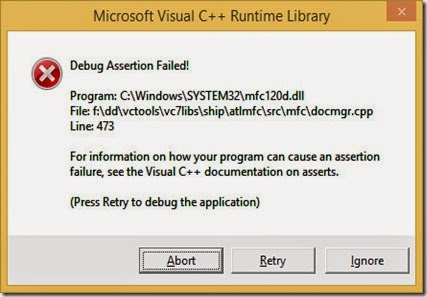
This is not a program “crash” in the ordinary sense.
The program “hit” an ASSERT statement which halted the program.

This is not a program “crash” in the ordinary sense.
The program “hit” an ASSERT statement which halted the program.
Friday, 16 January 2015
Building TRViewer – part 2
To build the release version of TRViewer, change the active configuration in the toolbar to Release and click BUILD>Build Solution.


Thursday, 15 January 2015
Building 3D Studio File Toolkit in VS2013
I’ll preface this post with the disclaimer that I am only a novice in C/C++ programming and using Visual Studio.
In the course of building TRViewer [link] the linker gave an error about not being able to open LIBC.lib.
LIBC is an old version of the Microsoft C runtime that was removed in Visual Studio 2005.
TRViewer is a Visual Studio 2003 project and so the third party libraries it uses from that era may use old Visual Studio default libraries.
It was found that the library requiring LIBC was the 3D Studio File Toolkit, ftkvc40.lib which had presumably been built in Visual C 4.0.
3D Studio File Toolkit is used to manage the 3D modelling format, *.3DS.
The quick fix was to set the linker to ignore LIBC using the /NODEFAULTLIB option.
According to posts found on the internet [link1, link2, link3] the proper thing to do is to recompile the library dependent on LIBC in the same version of Visual Studio in which you are building your program.
The rebuilt library must also use the same C runtime as your program.
The C runtime that a program uses is set in the project’s property pages.
See Configuration Properties>C/C++>Code Generation>Runtime Library where you have the choice of four runtimes, /MT, /MTd, /MD or /MDd.

/MT and /MTd link to static runtimes and /MD and /MDd link to DLL runtimes.
In the course of building TRViewer [link] the linker gave an error about not being able to open LIBC.lib.
LIBC is an old version of the Microsoft C runtime that was removed in Visual Studio 2005.
TRViewer is a Visual Studio 2003 project and so the third party libraries it uses from that era may use old Visual Studio default libraries.
It was found that the library requiring LIBC was the 3D Studio File Toolkit, ftkvc40.lib which had presumably been built in Visual C 4.0.
3D Studio File Toolkit is used to manage the 3D modelling format, *.3DS.
The quick fix was to set the linker to ignore LIBC using the /NODEFAULTLIB option.
According to posts found on the internet [link1, link2, link3] the proper thing to do is to recompile the library dependent on LIBC in the same version of Visual Studio in which you are building your program.
The rebuilt library must also use the same C runtime as your program.
The C runtime that a program uses is set in the project’s property pages.
See Configuration Properties>C/C++>Code Generation>Runtime Library where you have the choice of four runtimes, /MT, /MTd, /MD or /MDd.

/MT and /MTd link to static runtimes and /MD and /MDd link to DLL runtimes.
Wednesday, 14 January 2015
Building TRViewer in VS2013 Community Edition
TRViewer is a program used in the Tomb Raider Level Editor (TRLE) community.

To compile and build TRViewer Microsoft Visual Studio must be used because TRViewer is a Multi Document Interface (MDI) program that uses the Microsoft Foundation Classes (MFC).
MFC is only included with the professional versions of Visual Studio and to use MFC with the free Express versions you had to complete a complicated process outlined at the CodeProject site. [link]
Microsoft has released a free version of Visual Studio that includes MFC called Visual Studio 2013 Community Edition so we will see if it can be used to build TRViewer.
TRViewer was originally built in Visual C++ 6.0 and Visual Studio.Net 2003 and if you have a copy of those programs you should use them.
Because there have been lots of changes in the C++ language and Visual Studio since 2003 we will get lots of errors in Visual Studio 2013 building TRViewer and there is no guarantee we will be successful.
I only know the basics of C/C++ and am a novice with Visual Studio and MFC but let’s give it a try.

To compile and build TRViewer Microsoft Visual Studio must be used because TRViewer is a Multi Document Interface (MDI) program that uses the Microsoft Foundation Classes (MFC).
MFC is only included with the professional versions of Visual Studio and to use MFC with the free Express versions you had to complete a complicated process outlined at the CodeProject site. [link]
Microsoft has released a free version of Visual Studio that includes MFC called Visual Studio 2013 Community Edition so we will see if it can be used to build TRViewer.
TRViewer was originally built in Visual C++ 6.0 and Visual Studio.Net 2003 and if you have a copy of those programs you should use them.
Because there have been lots of changes in the C++ language and Visual Studio since 2003 we will get lots of errors in Visual Studio 2013 building TRViewer and there is no guarantee we will be successful.
I only know the basics of C/C++ and am a novice with Visual Studio and MFC but let’s give it a try.
Monday, 12 January 2015
NuGet Package Manager – part 1
NuGet Package Manager is an extension for Visual Studio that simplifies installing third party libraries for a project. [link]
NuGet Package Manager downloads a package containing the third party library and configures the project to use the library.
Normally you would have to download and extract the library, configure the project to find the Include and Lib directories of library and add the library’s *.lib file or files to the project’s dependencies in the project’s Property Pages.
NuGet Package Manager downloads a package containing the third party library and configures the project to use the library.
Normally you would have to download and extract the library, configure the project to find the Include and Lib directories of library and add the library’s *.lib file or files to the project’s dependencies in the project’s Property Pages.
Metasequoia 4 Plugins – Getting Started
New features can be added to a registered version of Metasequoia by installing plugins.
A plugin is a *.dll (dynamic link library) file.
A *.dll is a type of program created within a software development environment such as Lazarus, Delphi, Visual Studio, CodeBlocks, Orwell's DevCPP, NetBeans, ZinjaI, Pelles C, Falcon C++, CodeLite or text editor/compiler/linker combination.
A *.dll cannot be executed by double clicking on it for instance, but must be loaded by another program and just contains coded functions which are used by the other program.
tetraface Inc. provides a Software Development Kit (SDK) that must be used to write plugin *.dlls for Metasequoia.
In this post I will outline the process of building the plugin examples included in the SDK.
A plugin is a *.dll (dynamic link library) file.
A *.dll is a type of program created within a software development environment such as Lazarus, Delphi, Visual Studio, CodeBlocks, Orwell's DevCPP, NetBeans, ZinjaI, Pelles C, Falcon C++, CodeLite or text editor/compiler/linker combination.
A *.dll cannot be executed by double clicking on it for instance, but must be loaded by another program and just contains coded functions which are used by the other program.
tetraface Inc. provides a Software Development Kit (SDK) that must be used to write plugin *.dlls for Metasequoia.
In this post I will outline the process of building the plugin examples included in the SDK.
Subscribe to:
Posts (Atom)